Fortinet
🔧 Prerequisites
-
A Fortinet firewall that supports external blocklists.
-
Access to your Fortinet management interface (e.g., FortiGate).
- A Sceptive bl0ck account with API access.
Steps
The bl0ck Fortinet integration allows you to block malicious IPs in your Fortinet firewall.
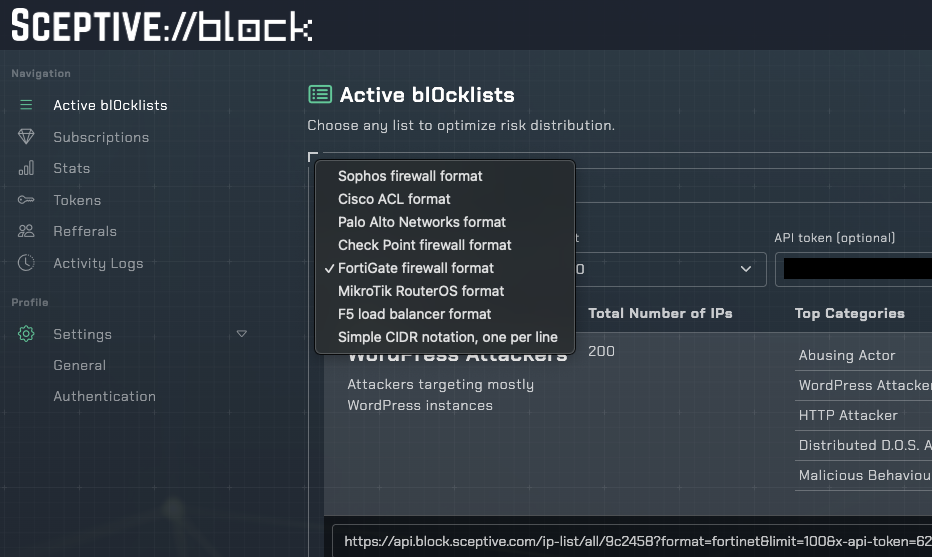
In your Sceptive bl0ck dashboard, navigate to Active bl0cklists and select Fortigate Firewall format.
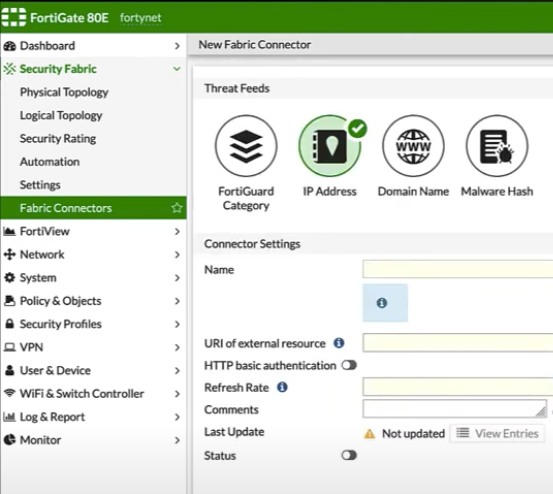
After getting the relevant API URL for the list you want to submit, create a Fabric Connector from Security Fabric -> Fabric Connectors -> Threat Feeds -> IP Address and paste API URL into the URI of external resource box.
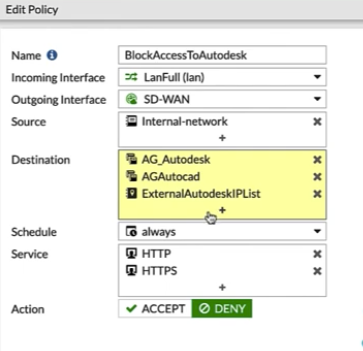
After registering the connector, activate the list by create a new policy on any interface you want with Policy & Objects -> IPv4 Policy and adding fabric to the relevant policy destination (and/or source) list.